Edit Production Planning Dialog
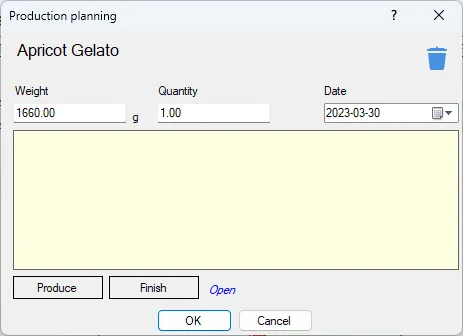
Edit a production planning item for a recipe or a recipe group.
If the production planning is a RCPX a Edit RCPX button is shown where you can see and edit the RCPX.
Weight
The weight to be produced. By default the weight is set to the weight of the recipe.
Quantity
Weight is converted to a quantity as well, so you can either type in the total weight or type in the quantity. If you for example type in 2 for quantity the weight will be double the weight of the recipe.
Date
The planned production date.
Note
Just an optional note.
Produce
Press this to open the Produce dialog.
Finish
When the production is finished you press this to flag it as Produced and you can also update any linked products in the inventory. Opens the Close production dialog.